
As a new student of Luke Skywalker’s Jedi Academy, follow an ancient tradition and learn the powers – and dangers – of the Force™.
As a Dark Jedi Cult knows as the Disciples of Ragnos threaten the galaxy, Jaden Korr, a student of Luke Skywalker’s Jedi Academy must learn the ways of the jedi in order to defend it. On the path to becoming a Jedi Master Jaden must fight through various missions taking place accross the galaxy, from Hoth to Tattoine. Upon each victory, Jaden’s powers grow until eventually becoming an apprentive to Kyle Katarn, and must fight the temptation of turning to the dark side.
Interact with famous classic Star Wars™ locations and characters while facing the ultimate choice: fight for good and freedom in the light side or follow the path of power and evil to the dark side. Create your own characters by defining various characteristics, such as species, gender, clothing and physical attributes allowing for a more personal experience before entering the academy to learn the powers – and dangers – of the Force™. Construct your own lightsaber™ from handle to blade color. Unique tiered level selection allows you to choose you adventure and the missions you take based on the skills you need to become the ultimate Jedi Knight.
– Construct custom lightsabres™
– Customize characters before enrolling in the academy
– Six multiplayer modes including team based siege mode and two-on-one power duel
-23 multiplayer arenas
Minimum System Requirements:
Windows XP / Vista / 7 / 8 / 10 Hard drive: Intel Pentium 4 1.8 Ghz or AMD Athlon 1.8 GHz
Memory: 1 GB
Graphics:128 MB with Hardware T&L DirectX®: Directx 9.0b or better Hard Drive: 3.5 GB Sound: Directx 9.0c compatible
ACCEPTANCE OF TERMS OF USE REQUIRED TO PLAY
Please be advised that Windows 10 operating system will receive frequent hardware driver and software updates following its release; this may affect game compatibility
Screen Shots:


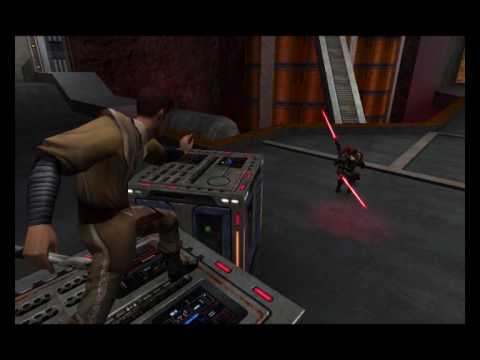
Video(s):
FreeGOGPCGames.com Presents
Star Wars: Jedi Knight – Jedi Academy (c) Lucasfilm / Disney
As a new student of Luke Skywalker’s Jedi Academy, follow an ancient tradition and learn the powers – and dangers – of the Force™.As a Dark Jedi Cult knows as the Disciples of Ragnos threaten the galaxy, Jaden Korr, a student of Luke Skywalker’s Jedi Academy must learn the ways of the jedi in order to defend it.
More info here: https://www.gog.com/game/star_wars_jedi_knight_jedi_academy
How to Download & Install
- Click the DRM-Free Star Wars: Jedi Knight – Jedi Academy v1.01A download link below.
- Wait for the download client to finish (100%), then locate the downloaded files/folder.
- Install the game:
– Run or Double click setup_sw_jedi_academy_2.0.0.4. exe - Once installation is complete, launch the game and enjoy!
Support the developers: If you like the game, please consider buying the official version.
Need help? Visit our FAQs page for common issues and solutions.
Old Links and Patches
We are keeping some of the old links and patches to make sure you can revert back to old version if you have problem with the latest version.
Old Link/s:
No old link available at the moment.
Download Here⇩
Official DRM-Free GOG installer – no activation or online account required to play.
Size: 1.25 GB
Star Wars: Jedi Knight – Jedi Academy v1.01A / 2.0.0.4 (GOG)
dffdgauvheunhusybvfhyierhbfvyiysdfvuybhrieuvnh irgfvy erfbsdyugvfiyw sebiywtefg segbvfuie r gaerbgferivfherybv usrvfirbv usbgrvfbruivb udrhb vi urenv uirdbv uabn egyvr hrdvui dbrvyuhadbr vkhsrdb vyub drjv budyrbvhuzdrn vuirebvr7ysbfuo drbvy8 gso8n uorbvouy brbv asruig br8oyb ryb gyur bgyubr uygerb uerbh gfire ug baerougt erob guoerbgyuer bgu yerogh rubyguyaebguaerg u rg erugy eruog uorbh tourg rabgo aberugh uaehr ag8o hrogya oruague rbgorbglobr go broug b9r g97yb ua bouab r uayrgb uar bygyuarg78034y78q509fh908 hfq3470hf7 0 78fh 84h f08qh 4f80h408 hq3408 hq340h 0q4304 h0 f0 h 7hf4 0q487hf0q43 yq8374y 0y43y qfy8 y q4hfh 4qh q34h0 4hq4q34 h0f q4h07f u09j0ju9ernju0-9fju9f4 9qj 4j804q3j098q34u809 40 337 #custom key mapping work it out
??? 🙁
Is this the latest version available?
This is the latest we can find 🙁
yes !
Seems like you cant play it with Windows 10
try compatibility mode
that was a major problem with this game on windows 10 cause win 10 removed the specific compatibility pack this game needed. I know on steam though someone created a fix/crack to make it run right on windows 10 to get around this issue. There was nother game you posted awhile back btw one the harry potter film games back in the day had same problem with win 10 removing and ignoring 1 of the 3 compatibility packs i also know dark forces 2 and the first Jedi knight secrets of sith or whatever had similar issues (as does many others from that specific period of time those ran on)
how
?
Can you play multiplayer with this?
Not sure as we do not test MP here. 🙁
yes you can !
Does multiplayer work?
Not sure we do not test Multiplayer 🙁
yes you can play multiplayer. some servers still working today!
why i not found the server?
What do i do if i boot up the game and i get the title screen and nothing happens?
Not sure about the problem 🙁 have you installed the software’s from windows like visual c++, directx and .net framework? you will find download links on our FAQs page.
It says the source file is corrupted.
Have you successfully installed the game on your system?
Did you already tried lunching the game in its installation DIR/folder?
Why can I only choose one handed single hilt lightsabers?? I wanted a double bladed one! 🙁
You get double bladed or duel wield later on in the story 🙂
THIS GAME IS FANTASTICI BEEN LOOKING FOR THIS GAME SINCE I WAS 15 NOW THAT IM 20 SO IT TAKE 5 YEAR TO FIND REAL GAME SITE
😀 😀 😀
This game is one of the best jedi games ever! Multiplayer does work but I suggest you download movie battles 2, they are mods which has a huge community playing it. Make sure you run as admin and in compatibility mode.
My friend playing this game, https://www.youtube.com/watch?v=5nH9kVDR0g8
Best part is you can download free maps, create a local network and play with people in the same household. Or simply join a game in movie battles and play in a variety of star wars classes.
Online works and you can use mods! Best game ever! 😀
Game works beautiful! Online is so much fun using the Movie battles 2 (google it) There is a huge online community and people create youtube videos from it. I appeared in a few already 😀
Game works perfect! Also online works fine
Please help! i can not start jedi academy or quake 3 due to a failure to load OpenGL is there any solution to this?
You can try this solution please check:
https://goo.gl/CBVsdZ
For some reason during the installing an error always occurs when copying a file, every time a GameData/base/assets#.pk3 (# is number 0 to 3) how can I fix this?
You can try this: https://goo.gl/QT95gv
My game crashes on the loading screen, Im with windows 10 , i tried compability mode with Windows 7 and its the same, what could i do ?
Did you install the software’s from windows like visual c++, directx and .net framework? Most of the error will be solve by installing them you can find download link via our FAQs page
No i didnt, in the faq page says i need a few packages of C++, does that mean i have to instal all of them?
Yes if you want to get rid of errors on older games you want to play 😀
i have directx and framework, but cant get the c++ packages, when i try install them it says my system doesnt support them
What version is your OS? You can check on the internet for info about your os and compatibility of the program 🙁
My computer info says im wtih Windows 10 pro 32 bit, based on 64 bit processor
You are using 32bit windows so you need a 32bit program
When i try to open up installer the whole folder freezes
Can you please add details on the problem you have encountered?
Your game is cool.