
HighFleet v1.163d
HighFleet is a dieselpunk action-strategy game set on a future Earth where you command a fleet of massive flying ships as part of the Sayadi Task Force. You explore the continent of Gerat, manage resources, engage in diplomacy, and build your fleet to reclaim the rebellious kingdom. Tactical combat focuses on positioning to exploit enemy weak points, and a detailed ship editor allows you to design and customize vessels with modular components. The game blends real-time strategy with deep shipbuilding and narrative-driven decision-making.
Show 1 more game badges

HighFleet Overview

In a world with no memory of its past. The House of Sayadi sends its thousand-ton military ships to the skies. Stirring the peace of nations inhabiting the earth they strive to bring back what they have lost.
As a commander of the Sayadi Task Force you’ve been sent to regain control of the rebellious Kingdom of Gerat by whatever means necessary. To succeed will require careful exploration, clever resource management, cautious diplomacy and building a fleet capable of ruling the skies unchallenged.
But maybe a much greater destiny awaits you in this journey. As this forsaken land still hides the mysterious prophecies of a long forgotten past.
Killer combat
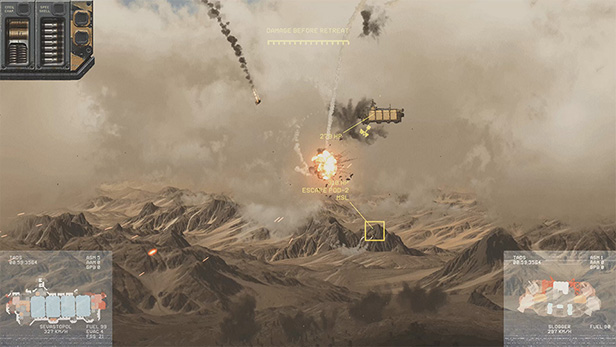
At the heart of HighFleet is a unique form of combat in which giant ships bristling with weaponry duel above the desert. This is no mindless button mashing, however. Far from it. Battles are won by skilfully moving into positions that allow you to exploit your enemies’ weak spots.
Serious strategy
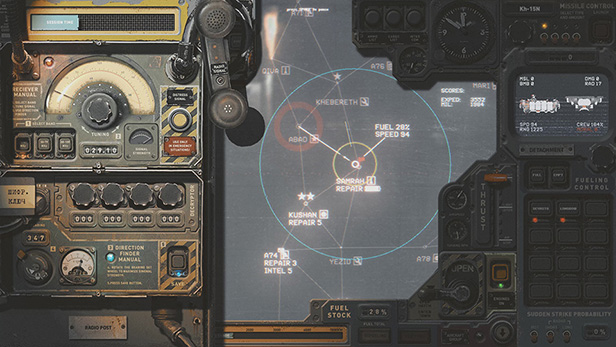
Mastering HighFleet requires much more than winning battles. You must explore the mysterious lands of Gerat. You must manage your ships, men, fuel and other resources. You must engage in diplomacy with the various factions. And then there’s the prophecy to be unravelled…
Freedom to fly
Thanks to HighFleet’s in-game ship editor, you can build the perfect fleet to suit your style of fighting. The many distinctive ship options and upgrade paths ensure the game will provide plenty of replay value.
One-of-a-kind world
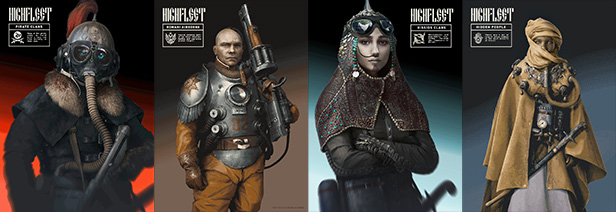
The “dieselpunk” visual aesthetic, immersive music and sounds, and underlying mystery of HighFleet combine to create a truly unique and unforgettable atmosphere. This is a world you won’t want to leave until you’ve uncovered every secret and followed your destiny to the very end.
System Requirements
- System: 64-bit Windows 10 / 64-bit 8.1
- Processor: Intel i3-2100 , AMD Athlon 200GE
- Memory: 4 GB RAM
- Graphics: Nvidia GeForce GT 950
- Storage: 2 GB available space
- Additional Notes: DirectX Compatible Sound Card; Full High Definition (1920x1080); Requires a 64-bit processor and operating system
- System: 64-bit Windows 10 / 64-bit 8.1
- Processor: 4 cores Intel | AMD CPU (Intel i3-8100, AMD Ryzen 3 1200)
- Memory: 8 GB RAM
- Graphics: Nvidia Geforce GTX 1070
- Storage: 2 GB available space
- Additional Notes: DirectX Compatible Sound Card; Requires a 64-bit processor and operating system
HighFleet Free Download
Additional Download Details
Free GOG PC Games PRESENTS:
HighFleet © Konstantin Koshutin / MicroProse Software
We only provide full unmodified DRM-free GOG installers. No serial key, activation, or crack needed.
Latest we have v1.163d –> Check version info and changelog
Easy to Download, Install and Play
- Click the download button. You can also select a previous version if available.
- You’ll be redirected to Vidgazoo. Wait 5 seconds, then directly click the button or copy the link.
- Make sure you have a supported download client installed (it’s free here) before downloading.
- Once the download process reaches 100%, locate the downloaded files.
- Get ready for installation and make sure you have enough disk space for the game.
- To Install DRM-free HighFleet:
- Run or double-click
setup_highfleet_********.exeto launch the installer. - Follow the on-screen instructions to complete the installation.
- If a DLC folder is included, run any
.exefiles inside it as well.
- Run or double-click
- Once the installation is complete, launch the game and start playing.
Need help?
Check our FAQs for common questions and fixes. If you need additional assistance, you can also visit the official GOG Support Center.


