
Riven Deluxe Edition v1.7.6
Riven is a first-person puzzle adventure set in a beautiful but unstable world on the verge of collapse. Explore interconnected islands, investigate strange machinery, and solve environmental puzzles while searching for answers about Gehn, Atrus, and the people of Riven. This 2024 reimagining expands the original adventure with free movement through a real-time 3D world, updated puzzles, new visuals, and additional story details while remaining faithful to the atmosphere and mystery of the classic game.
Show 1 more game badges

Riven Deluxe Edition Overview
“I know what he’s doing… He’s watching you.”
Travel to Riven, a beautiful and mysterious world on the verge of collapse. Explore this mysterious place, solve its puzzles, reveal its mysteries, make a daring rescue, and escape.
VISIT A MYSTERIOUS WORLD
“I am Gehn. I assume you’ve heard of me.”
Riven takes you on a journey through dense jungles, awe-inspiring caverns, and monolithic structures. Explore a world bent to the whims of a man who sees himself as a god and where every corner will immerse you in an otherworldly adventure.
IMMERSE YOURSELF IN A SURREAL LANDSCAPE
“There’s a great deal of history that you should know…”
Riven rewards careful observation. Challenge Riven’s cunning puzzles, deftly woven throughout its narrative. The environment of Riven will reveal the story of this world as you make meaning from seemingly disparate bits of information and learn everything you need to know about this world.
UNRAVEL RIVEN’S SECRETS
“…it may be time to give this inexplicable mystery a second look.”
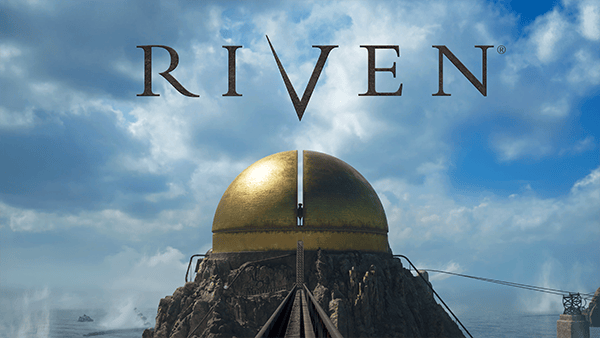
Who are the mysterious island dwellers you encounter during your exploration? What purpose does the giant golden dome serve? Why is this world on the verge of collapse? Play Riven and discover the answers to these mysteries- and more.
ABOUT THIS REMAKE
Created by the legendary indie developer Cyan Worlds and based on the smash-hit original released in 1997, Riven has been lovingly revisited by its key original visionaries to expand the epic narrative of the Myst universe.
Experience Riven like never before – with free movement through a real-time 3D environment. This brand-new, re-imagined, and expanded version of Riven offers a deeper story, new captivating visuals, and a journey that stays true to the original release while also expanding on Riven’s breathtaking world.
System Requirements
- System: Windows 10 or 11
- Processor: AMD Ryzen 7 2700X Eight-Core Processor (16 CPUs), ~3.7 GHz; Intel i5 7000 series
- Memory: 16 GB RAM
- Graphics: AMD Radeon RX 5700XT; NVIDIA GeForce GTX 1070 8 GB; at least 6 GB VRAM
- DirectX: DirectX 12
- Storage: 30 GB available space
- Additional Notes: Quest 2 over Airlink or Link cable, HTC Vive Pro, Valve Index; Note that laptops with a 3050 or 3050 Ti GPU do not fit the requirements of the above. We recommend checking your preferred PC Benchmark site to confirm if your specs meet or exceed the above; Requires a 64-bit processor and operating system
- System: Windows 10 or 11
- Processor: AMD Ryzen 7 3800X 8-Core Processor (16 CPUs), ~3.9 GHz; Intel i5 11000 series
- Memory: 32 GB RAM
- Graphics: AMD Radeon RX 6800XT; NVIDIA GeForce GTX 1080 Ti 11 GB; at least 8 GB VRAM
- DirectX: DirectX 12
- Storage: 30 GB available space
- Additional Notes: Quest 3 over Airlink or Link cable, HTC Vive Pro, Valve Index; Note that laptops with a 3050 or 3050 Ti GPU do not fit the requirements of the above. We recommend checking your preferred PC Benchmark site to confirm if your specs meet or exceed the above; Requires a 64-bit processor and operating system
Riven Deluxe Edition Free Download
Additional Download Details
Free GOG PC Games PRESENTS:
Riven Deluxe Edition © Cyan Worlds / Cyan Worlds
We only provide full unmodified DRM-free GOG installers. No serial key, activation, or crack needed.
Latest we have v1.7.6 –> Check version info and changelog
Previous versions (1)
Easy to Download, Install and Play
- Click the download button. You can also select a previous version if available.
- You’ll be redirected to Vidgazoo. Wait 5 seconds, then directly click the button or copy the link.
- Make sure you have a supported download client installed (it’s free here) before downloading.
- Once the download process reaches 100%, locate the downloaded files.
- Get ready for installation and make sure you have enough disk space for the game.
- To Install DRM-free Riven Deluxe Edition:
- Run or double-click
setup_riven_deluxe_edition_********.exeto launch the installer. - Follow the on-screen instructions to complete the installation.
- If a DLC folder is included, run any
.exefiles inside it as well.
- Run or double-click
- Once the installation is complete, launch the game and start playing.
Need help?
Check our FAQs for common questions and fixes. If you need additional assistance, you can also visit the official GOG Support Center.


