
Cossacks 3 v2.2.3.92.6008+7DLC
Cossacks 3 is a historical real-time strategy game set in the 17th and 18th centuries where players manage resources, build bases, and command armies from twelve European nations. Engage in massive land and naval battles with up to 16,000 soldiers across five single-player campaigns, skirmishes, and multiplayer matches. Research technologies, construct over 140 historical buildings, and deploy seventy unit types to gain tactical advantages on randomly generated maps. Support for up to eight players in online matches includes alliances and competitive play against AI or human opponents.

Cossacks 3 Overview
Return of the legendary Cossacks! The sequel of the award winning strategy series.
Cossacks 3 is a rare combination of war, economy, army developing, building and upgrading that couldn’t be found in any game for the last 15 years. This deep RTS gameplay will return old fans in the golden ages of the genre and give newcomers a unique experience.
This remake of the classic game, that originally launched in 2000, contains all of the elements that distinguish the successful Cossacks games and combines them with contemporary 3D-graphics. Cossacks 3 provides the player with infinite tactical options, including not only the construction of buildings, the production of raw materials, but also the broad selection of various units and the influence of the landscape.
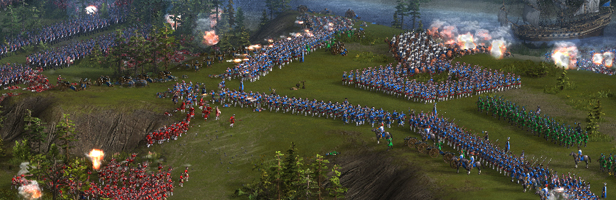
Twelve nations, 70 different unit types, 100 research opportunities, and over 140 different historical buildings are available to the player. Besides the battles ashore, players can build an armada and attack their enemies at sea. Cossacks 3 offers five historic single player-campaigns and up to eight players can fight each other in multiplayer-mode on one map. The player can forge alliances with or against others as well as challenge the computer. Randomly generated maps provide endless variations and can be adapted to the gamer’s needs.
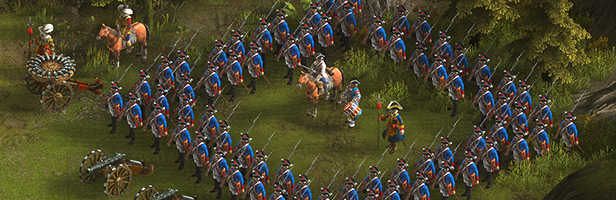
- Grandiose battles of up to 16,000 soldiers on the battlefield
- 12 playable nations
- 100 research opportunities
- 140 different historic buildings
- Battles ashore and at sea
- Five singleplayer historical campaigns
- Infinite variations of battles on randomly generated maps
Note: This game may require additional serial key for multiplayer mode. In case it is not automatically generated in your GOG library (open it via website → select the game → More → Serial Keys), please reach out to our Support team.
System Requirements
- System: Windows XP / Vista / 7 / 8 / 10
- Processor: Intel Core 2 Duo E8400 3.0 GHz / Core i3 1.6 GHz / AMD Athlon II X2 280
- Memory: 3 GB RAM
- Graphics: nVidia GeForce 9600 GT / Radeon HD 4830 / Intel HD5000
- DirectX: DirectX 9.0c
- Storage: 4 GB available space
- Additional Notes: Broadband Internet connection; Minimal screen resolution - 1280×768; Mouse and keyboard
- System: Windows XP / Vista / 7 / 8 / 10
- Processor: Intel Core i5-3470, 3.20 GHz or AMD FX-6300, 3.5 GHz
- Memory: 6 GB RAM
- Graphics: nVidia GeForce 560 / ATI Radeon HD 7900 Series
- DirectX: DirectX 9.0c
- Storage: 6 GB available space
- Additional Notes: Broadband Internet connection; Screen Resolution - 1920×1080; Mouse and keyboard
Cossacks 3 Free Download
Additional Download Details
Free GOG PC Games PRESENTS:
Cossacks 3 © GSC Game World / GSC Game World
We only provide full unmodified DRM-free GOG installers. No serial key, activation, or crack needed.
Latest we have v2.2.3.92.6008+7DLC –> Check version info and changelog
Source: Digital
Type of publication : licensed from GOG
Interface language : English, German, French, Czech, Polish, Italian, Russian, Ukrainian, Spanish, Portuguese, Brazilian Portuguese , Turkish
Voice language : none
Included DLC:
– Cossacks 3: Days of Brilliance
– Cossacks 3: Digital Deluxe Upgrade
– Cossacks 3: Early Bird
– Cossacks 3: Guardians of the Highlands
– Cossacks 3: Path to Grandeur
– Cossacks 3: Rise to Glory
– Cossacks 3: The Golden Age
+
Bonus materials:
– cossacks_3_avatar.zip
– cossacks_3_ost_flac.zip
– cossacks_3_ost_mp3.zip
– cossacks_3_ost_wav.zip
– cossacks_3_wallpaper.zip
Easy to Download, Install and Play
- Click the download button. You can also select a previous version if available.
- You’ll be redirected to Vidgazoo. Wait 5 seconds, then directly click the button or copy the link.
- Make sure you have a supported download client installed (it’s free here) before downloading.
- Once the download process reaches 100%, locate the downloaded files.
- Get ready for installation and make sure you have enough disk space for the game.
- To Install DRM-free Cossacks 3:
- Run or double-click
setup_cossacks_3_********.exeto launch the installer. - Follow the on-screen instructions to complete the installation.
- If a DLC folder is included, run any
.exefiles inside it as well.
- Run or double-click
- Once the installation is complete, launch the game and start playing.
Need help?
Check our FAQs for common questions and fixes. If you need additional assistance, you can also visit the official GOG Support Center.


