
Carmageddon: Max Damage 1.0.0.9902d
Carmageddon: Max Damage puts players in a customizable vehicle to race and battle across updated classic environments, where scoring points comes from damaging opponents and hitting pedestrians. Progress through career and freeplay modes, upgrading your car's power and armor while unlocking new vehicles and weapons. Engage in single-player chaos or multiplayer mayhem, aiming to dominate the leaderboard through aggressive driving and tactical destruction.
Show 1 more game badges

Carmageddon: Max Damage Overview

U.S. ELECTION NIGHTMARE SPECIAL
The original PC release of Carmageddon: Max Damage launched with a “US Election Special” mode, taking inspiration from topical current events – as two of the least-liked meat sacks on the planet slugged it out to become the Most Powerful Person On Earth. This Special Edition has these game modes still in place, because it remains just as funny now as it was then to show the President and the failed candidate what you think… By MOWING THEM DOWN IN A VIDEOGAME! Not just once, but over and over again… Impale a horrified Hillary on the end of your mighty rod! Repulsificate demented Donalds straight to frigging CHINA! It’s hours of FUN for the whole FAMILY!
Carmageddon: Max Damage for PC features these 3 additional game modes:
Trumped-Up where every pedestrian is respectfully replaced by the President of the United States.
Hillaryious in which you’ll meet nothing but duplicates of the defeated Democratic candidate.
Mass Debate which features a politically correct balance of both characters.
Animals remain in the mix too – suitably accessorised… You haven’t lived till you’ve knocked the wig off of a penguin!
Carmageddon: Max Damage is the latest instalment in the legendary Carmageddon series. Carmageddon is the driving sensation where pedestrians (and cows) equal points, and your opponents are a bunch of crazies in a twisted mix of automotive killing machines. It’s the ultimate antidote to racing games!!

Play an adrenaline pumping bunch of game modes against AI opponents, or online against the rest of the Carmafan masses! Progress your Career through the Carma ranks or have a MultiPlayer romp in a Car Crusher, Fox ‘n’ Hounds (always been Stainless MP game session favourite!), Death Race or Checkpoint Stampede event – all frenetic fun, featuring Carmageddon’s trademark over-the-top violence, crazy PowerUps and non-stop laughs…
PLUS! You can relive all the mangling mayhem with the built-in Action Replay System. Featuring multiple choice of cameras and replay options – it’ll mean you never miss a pile-up again! Get your movies online and brag about your ped culling achievements. And there will be plenty of THOSE too – Achievements, Challenges and Collectables to hunt down, that’ll keep the whole family entertained for hour upon happy blood and oil splattered hour.
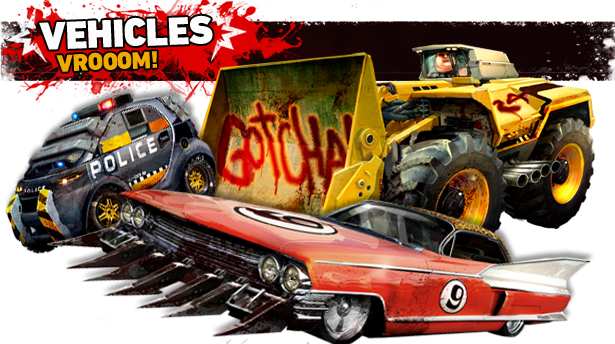
The Car Is The Star! Carmageddon: Max Damage features a wide and varied range of cool, crazy, custom killing machines; each with its own highly distinctive “character”. Carmageddon cars are specifically built for the job in hand – wrecking opponents and killing peds! Nearly 20 years ago the original Carmageddon invented the whole concept of videogame physics and real-time damaging of cars and scenery, and so it’s obviously been our responsibility to bring this technology BANG up-to-date with a brand new state of the art car damage (and repair) system. Crush, bend, twist, and completely mangle your opponents’ and your own car – smash parts off, or split it in two; the original game was all about wrecking motors and pummelling pedestrians, and today we take this to a whole new level! Power, Armour, and Offensive upgrades are available for your car, along with other customising options, allowing you to personalise the killing capabilities of your rides.

A host of old favourites from the original Carmageddon make a comeback, along with some all-new faces. Only ever seen before as low resolution mugshots, now you get to see them from head to toe (well, head to knees in the case of Screwie) in full HD 3D glory – usually as they smash through their windscreen and hurtle past (or INTO) yours!

The new environments are amalgamations of the best bits from the numerous chunks of landscape that we all loved to tear around in Carmageddon. “Bleak City”, “Devil’s Canyon”, “Dusty Trails”, “MagNuChem” and “Snowy” levels all return in updated forms, with their memorable landmark features such as the Loop ’de’ Loop, acid pits and Football Stadium. Everything is reassuringly surreal; hell, we’ve even managed to incorporate a giant food mixer into a level!
The topography and detail in the locations is updated and enhanced, with even more fun stuff to smash into, smash up, snap off, and send careening into the poor pedestrian population. “Nice Shot Sir!” And talking of pedestrians…

Once again, the game features a varied mix of adult pedestrians of all ages, shapes, persuasions and species. Classic pedestrians are back, such as old lady on a Zimmer frame and old man with his stick, with their famous cry “I was in the war!”, plus bikini babes and swimming trunk hunks, fat bastards, and herds of cows in improbable locations. Joining them are some new faces – including cyclists, wheelchair users and peds on mobility scooters. Carmageddon is an equal opportunities ped slaughterfest!

PowerUps are back and this time they’re even funnier, surrealier, hurtier, and messier than ever! Lots of the classic PUps return in super-enhanced form, such as Repulsificators, Kangaroos & Solid Granites. Then we have all new PUps like “Pelvic Thrust” and a variety under the heading “Tossers”! Combine PUps to create hilarious combo results like Groovin’ Helium Filled Peds, or Peds without legs at a Temporary Rapture!

Leaderboards. Challenge yourself to reach the top of the leaderboard using skill or brute force! Achievements. A suitably warped array of mad Feats and Exploits will garner you the rewards that every gamer dreams of. Challenges: Do the most stupid things, collect meaningless trinkets and waste hours of your life in the pursuit of ultimately pointless goals! Smelly Bushes: We’ve hidden a variety of these specially fragrant Easter Eggs throughout the game to keep you busy and entertained! CarMODgeddon: The whole game is MODdable for your MODding pleasure!
System Requirements
- System: Windows 7 (64-bit only) or later
- Processor: Intel i3-2100 3.1 GHz
- Memory: 4 GB RAM
- Graphics: 1 GB DirectX 11 (AMD HD 6000 series GPU or equivalent)
- DirectX: DirectX 11
- Storage: 20 GB available space
- Additional Notes: DirectX compatible; Laptop versions of graphics cards may work but are NOT officially supported
- System: Windows 7 (64-bit only) or later
- Processor: Intel i5-3570 3.4 GHz
- Memory: 8 GB RAM
- Graphics: 2 GB DirectX 11 (AMD HD 7800 series GPU or equivalent)
- DirectX: DirectX 11
- Storage: 20 GB available space
- Additional Notes: DirectX compatible; Laptop versions of graphics cards may work but are NOT officially supported
Carmageddon: Max Damage Free Download
Additional Download Details
Free GOG PC Games PRESENTS:
Carmageddon: Max Damage © Stainless Games / Stainless Games
We only provide full unmodified DRM-free GOG installers. No serial key, activation, or crack needed.
Latest we have 1.0.0.9902d –> Check version info and changelog
Easy to Download, Install and Play
- Click the download button. You can also select a previous version if available.
- You’ll be redirected to Vidgazoo. Wait 5 seconds, then directly click the button or copy the link.
- Make sure you have a supported download client installed (it’s free here) before downloading.
- Once the download process reaches 100%, locate the downloaded files.
- Get ready for installation and make sure you have enough disk space for the game.
- To Install DRM-free Carmageddon: Max Damage:
- Run or double-click
setup_carmageddon_max_damage_********.exeto launch the installer. - Follow the on-screen instructions to complete the installation.
- If a DLC folder is included, run any
.exefiles inside it as well.
- Run or double-click
- Once the installation is complete, launch the game and start playing.
Need help?
Check our FAQs for common questions and fixes. If you need additional assistance, you can also visit the official GOG Support Center.


