
Sovereign Syndicate v1.1.25 + 2 DLC
Sovereign Syndicate is a narrative-driven RPG set in a Victorian steampunk-inspired city where you investigate the disappearance of vulnerable citizens and uncover a mysterious cult. You play as three distinct characters whose intertwining stories shift based on your choices in combat, dialogue, and magic encounters. Instead of dice, the game uses a tarot card system to determine outcomes, adding chance and strategy to every decision. Your approach shapes how events unfold across each character’s path, blending investigation, roleplay, and supernatural elements in a morally complex world.
Show 1 more game badges

Sovereign Syndicate Overview
If you have Sovereign Syndicate in your library, enjoy a 20% loyalty discount on Hunter’s Moon: A Sovereign Syndicate Adventure — and on its Digital Deluxe Edition as well!
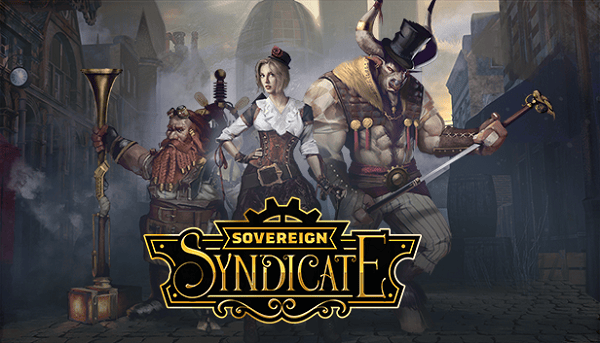
A Victorian steampunk RPG with tarot cards instead of dice. Investigate the disappearance of society’s most vulnerable to uncover a mysterious cult. Play as three characters, each with their own skills and motivations. Customize your characters with narrative choices to unlock new tarot cards.
Explore an open world in this Victorian steampunk cRPG. Choose from three playable characters with branching stories that intertwine. Investigate, interact, and take action to leave your mark on the world and its inhabitants. No random stat points here, use your skills to level them up, and trust your fate to our tarot card chance system.
So, how will you solve your problems? Combat, persuasion, magic, explosives? The choice is yours and all your cards are on the table; but be careful, the docklands aren’t for the faint of heart.

Tarot Card Chance System – Leave your dice at home as you interact with a variety of characters. NPC’s react to your gender, race, appearance, and choice of dialogue, so you’d better look and act the part if you want the “right” results. But not everything is certain, luck plays a role and it’s all in the cards with our tarot card chance system.
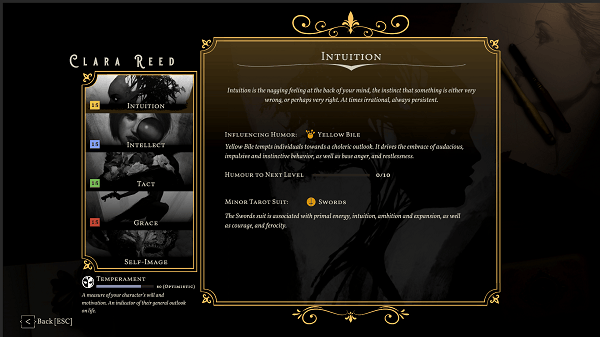
Skill and Etiquette System – The skills you use will improve your ability, while ignoring others will cause them to stagnate. Master the skills you choose and learn more about the world and its inhabitants to unlock special dialogue and skill-check options.
So go, see, do! And don’t be afraid to try the unconventional. Drown yourself in gin? Sure, provided you’ve got the constitution for it. Smoke that opium? Certainly, but be careful not to doze off— it might not be safe here. Put it all on black? You only live once, as they say. Even in failure you learn something…

A Rich Open World to Explore – A steampunk fantasy-inspired Victorian London awaits; filled with interesting characters and locations. Explore the back alleys, opium dens, brothels, and more at your peril, or relax and enjoy their simple pleasures. Investigate, interact, and take action to forge your own path.

Three Characters, Three Different Stories – Play as one of three characters with stories that intertwine through the city’s docklands and unfold based on your choices.
- Atticus Daley, an orphaned minotaur magician crawling out of the bottom of a bottle to find a sense of belonging, and his next fix.
- Clara Reed, a corsair with a checkered past, and a cunning woman with a rebellious streak. Follow her on a search for vengeance, and the courtesan killer.
- Otto, the trusty automaton and companion of engineer Theodore Redgrave. More than just the sum of his parts, Otto wants more to life than servitude and utility.
Each character has their own mix of skills, equipment, and expertise, and they might just have to work together to succeed. Will you trust your companions, and should they trust you? Not everyone is a hero after all.
Features:
- A large open world to explore, 20 different locations spread over the city’s east docklands
- Three playable characters
- Three intertwined stories to experience
- Branching narrative and dialogue system
- Character customization
- Tarot card chance system
- Single-player
Mature Content Description:
This game contains depictions of substance abuse and gambling, sexual references, violence, and mature language and subject matter.
System Requirements
- System: Windows 10
- Processor: Intel Core i3 or equivalent
- Memory: 8 GB RAM
- Graphics: Direct X Compatible Video Card with 2 GB Memory
- DirectX: DirectX 11
- Storage: 20 GB available space
- Additional Notes: Minimum system requirements may change during development; Requires a 64-bit processor and operating system
- System: Windows 10
- Processor: Intel Core i7 or equivalent
- Memory: 12 GB RAM
- Graphics: Direct X Compatible Video Card with 4 GB Memory
- DirectX: DirectX 11
- Storage: 20 GB available space
- Additional Notes: Recommended system requirements may change during development; Requires a 64-bit processor and operating system
Sovereign Syndicate Free Download
Additional Download Details
Free GOG PC Games PRESENTS:
Sovereign Syndicate © Crimson Herring Studios / Crimson Herring Studios
We only provide full unmodified DRM-free GOG installers. No serial key, activation, or crack needed.
Latest we have v1.1.25 + 2 DLC –> Check version info and changelog
Easy to Download, Install and Play
- Click the download button. You can also select a previous version if available.
- You’ll be redirected to Vidgazoo. Wait 5 seconds, then directly click the button or copy the link.
- Make sure you have a supported download client installed (it’s free here) before downloading.
- Once the download process reaches 100%, locate the downloaded files.
- Get ready for installation and make sure you have enough disk space for the game.
- To Install DRM-free Sovereign Syndicate:
- Run or double-click
setup_sovereign_syndicate_********.exeto launch the installer. - Follow the on-screen instructions to complete the installation.
- If a DLC folder is included, run any
.exefiles inside it as well.
- Run or double-click
- Once the installation is complete, launch the game and start playing.
Need help?
Check our FAQs for common questions and fixes. If you need additional assistance, you can also visit the official GOG Support Center.


