
First Racer
First Racer is an arcade racing game where players select vehicles and race across tracks with varying characteristics. The gameplay focuses on completing races as quickly as possible while managing car performance through upgrades earned from race winnings. Players can adjust vehicle settings, customize appearances with colors and stickers, and compete in local multiplayer matches. The game emphasizes fast-paced competition with straightforward driving mechanics designed for accessible yet skill-based racing experiences.
First Racer Overview
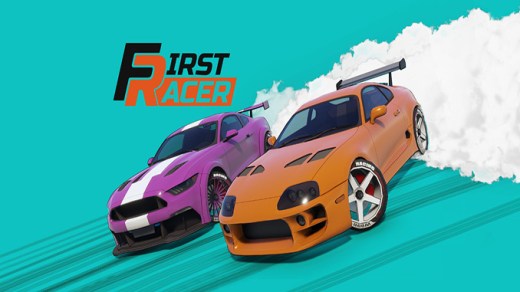
“First Racer” is an arcade racing game that puts you behind the wheel of racing cars. With intuitive controls and a wide selection of vehicles, you’ll need quick reactions and a competitive spirit to become the winner. The game features fast-paced races filled with adrenaline on various tracks, each with its own unique features. Whether you’re an experienced player or a newcomer to the racing genre, “First Racer” offers an exciting and immersive experience that will have you coming back again and again. So get ready to rev up your engines and show your competitiveness!
In First Racer, you can choose a car, upgrade its performance, adjust its settings, and change its appearance. You can make decisions that impact the handling, speed, and acceleration of your cars, allowing you to customize your car to your racing style. Additionally, you can change the appearance of your cars by choosing different colors, stickers, wheels, and other cosmetic upgrades.
In the game, there are different game modes:
- Racing: Drivers compete with each other to cross the finish line first. Races can take place on a track or in a city environment.
- Drifting: Drivers attempt to perform the longest and most impressive drift, sliding around corners with their car while maintaining control. Points are awarded based on speed, angle, and style of the drift.
- Off-Road Racing: Drivers participate in races that take place on rough, un-paved terrain such as dirt or gravel roads. Vehicles are usually modified with larger tires, increased clearance, and improved traction to overcome the challenging conditions. The main focus is on high-speed driving, maneuverability, and the durability of the vehicle.
You can use a gamepad to control the car, giving you a more realistic and comfortable gaming experience. The gamepad will allow you to easily and accurately control the car.
The game supports the “FANATEC CSL Elite PS4” racing wheel (other wheels from the “FANATEC” company should also work). Support for wheels from other manufacturers is also planned for the future.
System Requirements
- System: Windows 10
- Processor: Intel Pentium Silver N5000
- Memory: 2 GB RAM
- Graphics: NVIDIA GeForce MX150
- DirectX: DirectX 11
- Storage: 1 GB available space
- System: Windows 10
- Processor: Intel Core i5-8300H
- Memory: 4 GB RAM
- Graphics: NVIDIA GeForce GTX 1050
- DirectX: DirectX 11
- Storage: 1 GB available space
First Racer Free Download
Additional Download Details
Free GOG PC Games PRESENTS:
First Racer © Perfect Games / Red Bjorn
We only provide full unmodified DRM-free GOG installers. No serial key, activation, or crack needed.
Latest we have v1.1.30 –> Check version info and changelog
Source : Digital
Publication type : GOG License
Interface language : English, German, Russian, Spanish, French, Italian, Japanese, Korean, Chinese (simplified)
Voice language : English
Instructions
- Click the download button. You can also select a previous version if available.
- You’ll be redirected to Vidgazoo. Wait 5 seconds, then directly click the button or copy the link.
- Make sure you have a supported download client installed (it’s free here) before downloading.
- Once the download process reaches 100%, locate the downloaded files.
- Get ready for installation and make sure you have enough disk space for the game.
- To Install DRM-free First Racer:
- Run or double-click
setup_first_racer_********.exeto launch the installer. - Follow the on-screen instructions to complete the installation.
- If a DLC folder is included, run any
.exefiles inside it as well.
- Run or double-click
- Once the installation is complete, launch the game and start playing.
Need help?
Check our FAQs for common questions and fixes. If you need additional assistance, you can also visit the official GOG Support Center.


