
Summer in Mara
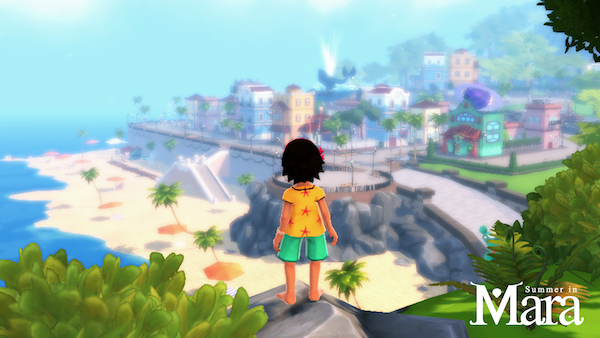
Summer in Mara is a cozy farming adventure set in a tropical archipelago where you play as Koa, a young explorer who tends her own island, grows crops, crafts tools, and sails across the open ocean to discover new islands. Befriend over 25 characters while completing more than 300 quests in a story focused on protecting the ocean from an evil corporation threatening the region.

Summer in Mara Overview
‘Summer in Mara’ is a summer adventure with farming, crafting, and exploring mechanics set in a tropical archipelago.
‘Summer in Mara’ is a single-player experience in a calm, relaxing environment, with a handmade look and an exciting narrative. You will be Koa, a little adventurer girl who wants to explore the world that surrounds her.
In ‘Summer in Mara’ you’ll have to take care of your own island, harvest your crops, create new tools and buildings, and sail with your boat to discover new islands and secrets.

KEY FEATURES
– An open ocean with over 20 islands to explore.
– Customize your own island with buildings, crops and farm animals.
– Over 25 characters to meet and befriend.
– More than 300 quests to make Mara a better place.
– Day and night cycle that have an effect on the world with climatic events.
You’ll have your own island, but taking care of something like that is a lot of hard work. You’ll be able to plant trees to get wood, and craft new tools and buildings with different materials. Or you can create crop fields to grow all kinds of vegetables. You’ll also have a farm with chickens and pigs to take care of.
But be careful, because this isn’t as easy as it looks! You’ll also be able to fish in a pond or in open sea,, cut trees with your hatchet, build things with your hammer, and use a hoe to help you harvest your island.

Koa will need your help. With a basic set of skills, she can acquire new abilities and learn from the world that surrounds her. We want you to feel like you’re growing up with Koa, bonding with her and with all the other people in the archipelago.
You’ll be able to sail to new islands and find treasures and other secrets in the middle of the sea with your trusty boat, which you can upgrade with a little effort and time.
With new islands comes new people. You’ll talk and trade with over twenty characters, each one with their own story and lives. They’ll give you quests, hints about the world, or just anecdotes about their experiences and travels. Getting to know them is a significant part of the game, so we put much effort into making them unique and exciting.

But not everyone will be friendly. An evil corporation called Elit wants to conquer Mara and exploit the ocean. Napopo is one of their first victims, a strange creature that will seek Koa for help.

System Requirements
- System: Windows 7
- Processor: Intel Celeron G1820 / AMD Athlon II X3 455
- Memory: 4 GB RAM
- Graphics: NVIDIA GeForce GT 430/ AMD Radeon R5 240
- DirectX: DirectX 11
- Storage: 2 GB available space
- System: Windows 7
- Processor: Intel Core i5
- Memory: 4 GB RAM
- Graphics: NVIDIA GeForce GTX 660 / AMD Radeon HD 7850
- DirectX: DirectX 11
- Storage: 2 GB available space
Summer in Mara Free Download
Additional Download Details
Free GOG PC Games PRESENTS:
Summer in Mara © Chibig / Chibig
We only provide full unmodified DRM-free GOG installers. No serial key, activation, or crack needed.
Latest we have v1.9 –> Check version info and changelog
Previous versions (1)
Instructions
- Click the download button. You can also select a previous version if available.
- You’ll be redirected to Vidgazoo. Wait 5 seconds, then directly click the button or copy the link.
- Make sure you have a supported download client installed (it’s free here) before downloading.
- Once the download process reaches 100%, locate the downloaded files.
- Get ready for installation and make sure you have enough disk space for the game.
- To Install DRM-free Summer in Mara:
- Run or double-click
setup_summer_in_mara_********.exeto launch the installer. - Follow the on-screen instructions to complete the installation.
- If a DLC folder is included, run any
.exefiles inside it as well.
- Run or double-click
- Once the installation is complete, launch the game and start playing.
Need help?
Check our FAQs for common questions and fixes. If you need additional assistance, you can also visit the official GOG Support Center.


