
The Corruption Within
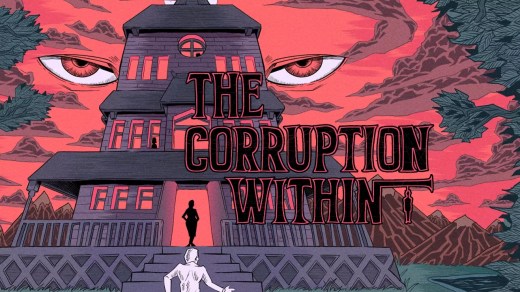
The Corruption Within is a first-person point-and-click psychological thriller set in the Victorian era. After a camping trip ends with your wife and two children mysteriously disappearing, you search for help at a secluded mansion by a lake and soon become caught in a much larger mystery. Explore the manor, solve puzzles, uncover hidden rooms, and investigate a cast of suspicious characters who may help or deliberately mislead you. Detailed low-resolution pixel art blends realism with surreal imagery, while horror themes, secrets, and an unsettling atmosphere gradually reveal what has happened to your family.
Show 1 more game badges
System Requirements
- System: Windows 10
- Processor: 2 GHz
- Memory: 2 GB RAM
- Graphics: 128 MB
- DirectX: Version 11
- Storage: 100 MB available space
- System: Windows 10
- Processor: 2 GHz
- Memory: 2 GB RAM
- Graphics: 128 MB
- DirectX: Version 11
- Storage: 100 MB available space
The Corruption Within Free Download
Additional Download Details
Free GOG PC Games PRESENTS:
The Corruption Within © Cosmic Void, Dave Seaman / Dionous Games
We only provide full unmodified DRM-free GOG installers. No serial key, activation, or crack needed.
Latest we have –> Check version info and changelog
Interface language : English, German, Russian, Spanish, French, Italian, Japanese, Korean, Polish, Br. Portuguese, Spanish, Latin American, Turkish, Chinese (simplified), Chinese (traditional)
Voice language : None
Easy to Download, Install and Play
- Click the download button. You can also select a previous version if available.
- You’ll be redirected to Vidgazoo. Wait 5 seconds, then directly click the button or copy the link.
- Make sure you have a supported download client installed (it’s free here) before downloading.
- Once the download process reaches 100%, locate the downloaded files.
- Get ready for installation and make sure you have enough disk space for the game.
- To Install DRM-free The Corruption Within:
- Run or double-click
setup_the_corruption_within_********.exeto launch the installer. - Follow the on-screen instructions to complete the installation.
- If a DLC folder is included, run any
.exefiles inside it as well.
- Run or double-click
- Once the installation is complete, launch the game and start playing.
Need help?
Check our FAQs for common questions and fixes. If you need additional assistance, you can also visit the official GOG Support Center.


