
Permafrost v0.44.5.4788+4DLC
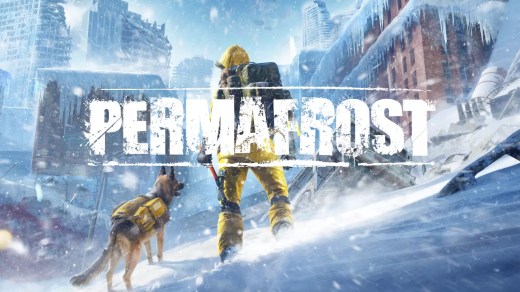
Permafrost is a story-driven open-world survival game set on a near-future Earth trapped in endless winter after catastrophic events shattered the moon. Play as a Rook, an engineer drawn into the frozen wilderness by a radio signal from a long-lost friend, and explore ruined cities and hostile landscapes. Survive frostbite, storms, and extreme cold by hunting, scavenging, crafting, repairing technology, and establishing shelters. Explore alone or with up to three friends, navigate faction-controlled territories, and rely on a loyal dog companion that can scout ahead, warn of danger, and carry supplies.
Show 1 more game badges
Permafrost Overview
You are a “Rook”; an engineer with the skills to rebuild, but little wilderness experience, drawn into this frozen, unforgiving world by a radio signal from a long-lost friend.
Experience a grounded, story-driven open-world survival set in a near-future Earth locked in endless winter after a series of catastrophes that culminated in the shattering of the moon. As a solo player or together with up to 3 friends, explore frozen cities and wilderness, survive brutal weather, navigate faction-controlled territories, hunt, scavenge, craft, and build a network of shelters to endure this post-apocalyptic world.

THE COLD IS YOUR TRUE ENEMY!
The cold is alive and ever-present. Frostbite, storms, and creeping chill shape every journey, turning preparation, shelter, and timing into matters of survival.
A FROZEN OPEN WORLD TO EXPLORE!
Traverse a frozen open world where city ruins fade into wilderness. A tense, grounded survival experience shaped by silence and scarcity – no constant gunfire, no fantasy tropes. Just winter, isolation, and resolve.
EXPLORATION-GATED PROGRESSION!
Progress is earned through exploration and adaptation. Restore abandoned shelters, repair broken machines, and reclaim fragile technology to push deeper into the frozen world.
YOUR DOG AS YOUR LOYAL COMPANION!
Your loyal dog companion stands with you when the cold turns everything else silent. Rescued from the ruins, your dog scouts ahead, warns of danger, carries supplies, and keeps you grounded when the silence gets to be too much.
SYMBIOTIC 1-4 PLAYER CO-OP SURVIVAL!
The cold doesn’t care how many of you there are. Play solo or survive alongside up to 3 friends, building shelter networks, dividing responsibilities, and playing to each other’s strengths. Co-op doesn’t simplify the world; it just means you don’t face the cold alone.
System Requirements
- System: Windows 10 (64-bit)
- Processor: Intel Core i5-8600K or AMD Ryzen 5 3500
- Memory: 16 GB RAM
- Graphics: NVIDIA GeForce GTX 1060 6 GB or AMD Radeon RX 590 8 GB
- DirectX: Version 11
- Storage: 30 GB available space
- System: Windows 10 (64-bit)
- Processor: Intel Core i5-12400 or AMD Ryzen 5 5600X
- Memory: 16 GB RAM
- Graphics: NVIDIA GeForce RTX 3070 Ti 8 GB or AMD Radeon RX 6750 XT 12 GB
- DirectX: Version 12
- Storage: 30 GB available space
Permafrost Free Download
Additional Download Details
Free GOG PC Games PRESENTS:
Permafrost © SpaceRocket Games / Toplitz Productions
We only provide full unmodified DRM-free GOG installers. No serial key, activation, or crack needed.
Latest we have v0.44.5.4788+4DLC –> Check version info and changelog
Interface language : English, French, German, Russian, Spanish – Spain, Japanese, Korean, Polish, Chinese (simplified)
Voice language : English
Included DLC:
– Soundtrack (FLAC)
– Soundtrack (mp3)
– Official Cookbook
– A Permafrost Novel
– Official Companion
Easy to Download, Install and Play
- Click the download button. You can also select a previous version if available.
- You’ll be redirected to Vidgazoo. Wait 5 seconds, then directly click the button or copy the link.
- Make sure you have a supported download client installed (it’s free here) before downloading.
- Once the download process reaches 100%, locate the downloaded files.
- Get ready for installation and make sure you have enough disk space for the game.
- To Install DRM-free Permafrost:
- Run or double-click
setup_permafrost_********.exeto launch the installer. - Follow the on-screen instructions to complete the installation.
- If a DLC folder is included, run any
.exefiles inside it as well.
- Run or double-click
- Once the installation is complete, launch the game and start playing.
Need help?
Check our FAQs for common questions and fixes. If you need additional assistance, you can also visit the official GOG Support Center.


