
Ghostwire: Tokyo
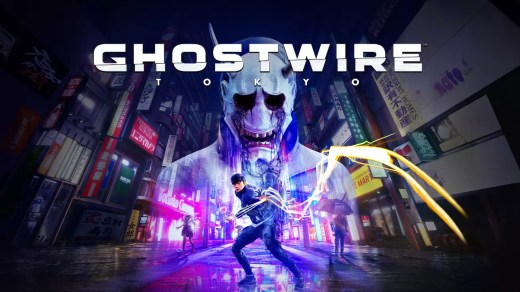
Ghostwire: Tokyo is a supernatural first-person action-adventure set in a haunting version of Tokyo after nearly the entire population suddenly disappears. Join forces with a powerful spectral entity, investigate the mysterious event, and battle dangerous supernatural forces while searching for your missing family. Explore modern city streets, traditional temples, narrow alleyways, rooftops, and famous landmarks such as Shibuya Crossing and Tokyo Tower. Master upgradeable elemental powers and ghost-hunting abilities, uncover side missions and secrets, and take on the additional challenges introduced with the Spider’s Thread update.
Show 1 more game badges
Ghostwire: Tokyo Overview
Face the unknown, uncover the truth and save the city
Tokyo is overrun by deadly supernatural forces as a dangerous occultist causes the city’s population to vanish in an instant. Join forces with a powerful spectral entity on their quest for vengeance and master a powerful arsenal of abilities to unravel the dark truth behind the disappearance as you FACE THE UNKNOWN in Ghostwire: Tokyo.
A Beautifully Haunted tokyo
Explore a unique vision of Tokyo twisted by a supernatural presence. From its ultra-modern cityscape to its traditional temples and narrow alleyways, discover a hauntingly beautiful city teeming with Yokai – vengeful spirits that prowl the streets.
Discover iconic landmarks like Shibuya Crossing and Tokyo Tower, stunningly rendered with incredible detail and built to take advantage of next-generation technology. Experience the city frozen in time when the city’s population disappeared, and travel to the surreal underworld on your quest to save your family.
Devastating Elemental Abilities
Wield a combination of upgradeable elemental powers and ghost-hunting skills to combat the supernatural threat. Use your ethereal abilities to ascend to the top of Tokyo’s skyline and soar over the streets to discover new missions or even get the drop on your enemies.
Explore all-new content with the Ghostwire: Tokyo Spider’s Thread Update
Free for all players, the Spider’s Thread update contains several additions to the base game, including a new area to explore, extended cutscenes, new side-missions, all-new enemies, added quality of life improvements, extra combat skills and a new roguelite “The Spider’s Thread” game mode!
System Requirements
- System: Windows 10 (64-bit, version 1909 or higher)
- Processor: Intel Core i7-4770K @ 3.5 GHz or AMD Ryzen 5 2600
- Memory: 12 GB RAM
- Graphics: NVIDIA GeForce GTX 1060, AMD Radeon RX 5500 XT, or Intel Arc A380 (6 GB VRAM or higher)
- DirectX: Version 12
- Storage: 26 GB available space
- Other: SSD storage required. For Intel Arc graphics, check Intel's website for compatible CPU and motherboard requirements.
- System: Windows 10 (64-bit, version 1909 or higher)
- Processor: Intel Core i7-6700 @ 3.4 GHz or AMD Ryzen 5 2600
- Memory: 16 GB RAM
- Graphics: NVIDIA GeForce GTX 1080, AMD Radeon RX 5600 XT, or Intel Arc A750 (6 GB VRAM or higher)
- DirectX: Version 12
- Storage: 26 GB available space
- Other: SSD storage required. For Intel Arc graphics, check Intel's website for compatible CPU and motherboard requirements.
Ghostwire: Tokyo Free Download
Additional Download Details
Free GOG PC Games PRESENTS:
Ghostwire: Tokyo © Tango Gameworks / Bethesda Softworks LLC
We only provide full unmodified DRM-free GOG installers. No serial key, activation, or crack needed.
Latest we have –> Check version info and changelog
Interface language : English, French, Italian, German, Russian, Spanish, Arabic, Spanish, Lat. Am., Portuguese (Brazil), Polish, Chinese (simplified), Chinese (traditional), Japanese, Korean
Voice language : English, French, Italian, German, Russian, Spanish, Spanish, Lat. Am., Portuguese (Brazil), Polish, Japanese
DLC:
– Original Game Soundtrack
– Spider’s Thread Soundtrack
– Deluxe Upgrade
Easy to Download, Install and Play
- Click the download button. You can also select a previous version if available.
- You’ll be redirected to Vidgazoo. Wait 5 seconds, then directly click the button or copy the link.
- Make sure you have a supported download client installed (it’s free here) before downloading.
- Once the download process reaches 100%, locate the downloaded files.
- Get ready for installation and make sure you have enough disk space for the game.
- To Install DRM-free Ghostwire: Tokyo:
- Run or double-click
setup_ghostwire_tokyo_********.exeto launch the installer. - Follow the on-screen instructions to complete the installation.
- If a DLC folder is included, run any
.exefiles inside it as well.
- Run or double-click
- Once the installation is complete, launch the game and start playing.
Need help?
Check our FAQs for common questions and fixes. If you need additional assistance, you can also visit the official GOG Support Center.


