
Cat Quest 1.4.7
Cat Quest is an action RPG set in the open world of Felingard. As a cat adventurer, rescue your catnapped sister from the evil Drakoth using real-time combat with sword slashes, dodge rolls, and magical spells. Equip different gear, explore dungeons for loot, and take on side quests from a cast of feline characters. The game features a charming pixel art style, lighthearted humor, and a fantasy kingdom populated entirely by cats.
Show 1 more game badges

Cat Quest Overview
Cat Quest is an open world RPG set in the pawsome world of cats!
Leap into a grand adventure in purrsuit of the evil Drakoth and your catnapped sister! Explore Felingard’s huge overworld map, risk life and limb delving into dungeons for epic loot, and lend a paw to a furry cast of characters in a flurry of side quests.

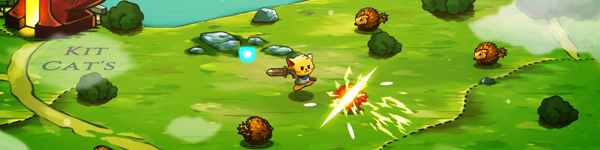
Real-time Combat
Combat in Cat Quest takes place entirely in real time, allowing you to get close to enemies with a slash of your blade, dodge roll to avoid a counter-attack, and then finish them off with powerful magic! Wield the ancient spells of Lightnyan, Flamepurr, and Healpaw to vanquish your foes! (Fur real!)

Equipment Customization
Outfit your catventurer with a whole basket of equipment! Prefurr casting spells? Don an arcane hood, robes, and a staff to bolster your mana reserves! Want to protect yourself from attack? Deck out your catventurer with chainmail armor to increase your health and provide an extra level of protection. Weapons, armor, and spells can be mixed and matched to create the purrfect combinations for your playstyle!
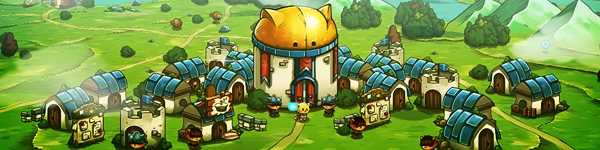
World Exploration
The world of Felingard is littered with interesting places and people! Discover a possessed town whose residents lust for obscene amounts of meat, assist the mages Mewlin and Meowgan in their search to break a magic seal, and locate someone’s missing delivery of “House of Parchments” and “The Pouncing Dead”. Exploration is one of the main scratching posts of Cat Quest, and with locations such as Bermewda’s Triangle, the Furbidden Fields, and Pawt City to explore, it’s time to get pawing!
Soundtrack
Experience an enchanting orchestral score inspired by classic RPGs!
System Requirements
- System: Windows 7
- Processor: Intel(R) Core(TM) i3-2100 CPU @ 3.10 GHz (4 CPUs), ~3.1 GHz
- Memory: 4 GB RAM
- Graphics: Intel(R) HD Graphics 520
- Storage: 250 MB available space
- System: Windows 10
- Processor: Intel(R) Core(TM) i7-7500U CPU @ 2.70 GHz
- Memory: 8 GB RAM
- Graphics: Intel(R) HD Graphics 620
- DirectX: DirectX 12
- Storage: 250 MB available space
Cat Quest Free Download
Additional Download Details
Free GOG PC Games PRESENTS:
Cat Quest © The Gentlebros / PQube Limited
We only provide full unmodified DRM-free GOG installers. No serial key, activation, or crack needed.
Latest we have 1.4.7 –> Check version info and changelog
Easy to Download, Install and Play
- Click the download button. You can also select a previous version if available.
- You’ll be redirected to Vidgazoo. Wait 5 seconds, then directly click the button or copy the link.
- Make sure you have a supported download client installed (it’s free here) before downloading.
- Once the download process reaches 100%, locate the downloaded files.
- Get ready for installation and make sure you have enough disk space for the game.
- To Install DRM-free Cat Quest:
- Run or double-click
setup_cat_quest_********.exeto launch the installer. - Follow the on-screen instructions to complete the installation.
- If a DLC folder is included, run any
.exefiles inside it as well.
- Run or double-click
- Once the installation is complete, launch the game and start playing.
Need help?
Check our FAQs for common questions and fixes. If you need additional assistance, you can also visit the official GOG Support Center.


